Overview
The SFG20 API provides functionality to retrieve data from a customer’s maintenance regimes and to indicate that a task has been completed.
Data can be retrieved in several formats, depending on your use case. For example, you could retrieve tasks based on the location of the asset being maintained and the frequency of the maintenance required, or you could retrieve tasks based on the schedule to which they belong.
You can retrieve data using:
The GraphQL API available at the URL provided as part of the DPP sign up process.
A playground is available for you to try the APIThe SFG20 CLI tool
The tasks retrieved are the abbreviated quick reference step lists for SFG20, not the entire SFG20 schedule. Tasks are abbreviated consistently to enable their display in mobile devices. The step lists are available either as a bullet point block of plain text or as a list of the individual steps in an array, where each entry is a plain text step content.
You should provide the SFG20 Smart Words associated with each task so that a user can type them into the SFG20 Application to access the full schedule contents and all the relevant introductory procedures. If you use the content block, the smart words are appended at the end.
Make sure you read and understand Display SFG20 Tasks before implementing a solution using the results of the API.
Summary of Changes Since Previous API Guidance Document
New Queries
batchRegimes
Lets you pull data from all regimes owned by a client that have been shared with you. Useful to:
minimise setup (client needs to provide one shareLinkId to the CAFM)
reduce the number of queries needed (instead of calling “regime” five times if there are five regimes, call this query once only)
New Mutations
recordTaskCompletions
An alternative way of marking tasks as complete in F-iQ.
Allows grouping of completions based on visit, without requiring asset and task IDs, although these are optional fields which are preferred.
New fields
Schedules
scheduleCategories indicates a schedules location within the SFG20 schedule library. It is the file path of the schedule within the library
Tasks Steps/Actions
fullContent produces the full task content, with no AI summary, in plaintext
fullHtmlContent produces the full task content, with no AI summary, and HTML formatting.
Webhooks
Allows you to listen for changes in FiQ. Currently, the only supported webhook type is sharelink changes, which notifies you when a new version of a regime has been pushed to the live state.
Get Access
To use the API, you will need an access token provided by SFG20 and a sharing link for the content to retrieve. The sharing link and the access token must both be in date.
Get an Access Token
If you have joined the Digital Partner Programme you may contact SFG20 and be issued an access token. When we create you an access token you will specify the domain that identifies you to clients wishing to share data with you. For example, somecompany.com.
Get a Sharing Link
A customer who wishes to share data with you creates a maintenance regime in Facilities-iQ, moves it to the “Candidate” or “Live” stages and then creates a sharing link. The sharing link should include the domain you specified for your access key as one of the intended recipients. For ongoing integrations, you should request a link to a Live regime because Candidate regimes will be deleted if promoted to Live.
Access the API via the GraphQL API
The GraphQL endpoint for the API is found at the URL provided as part of the DPP sign up process. It includes an IDE, available to a browser on that address, which allows you to try out queries. When using this tool, you will need to supply both the sharing link key and your access token.
While it is not necessary to install a GraphQL client to interact with the API, the endpoint requires requests to adhere to a GraphQL query structure. This means you can use more conventional HTTP request methods, such as JavaScripts ‘fetch’, to communicate with the endpoint, as seen in the following example:
Query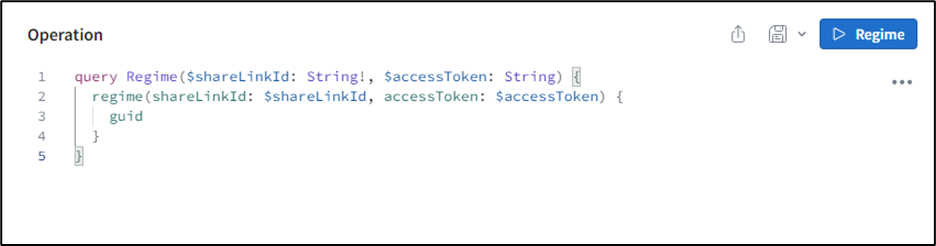
Usage
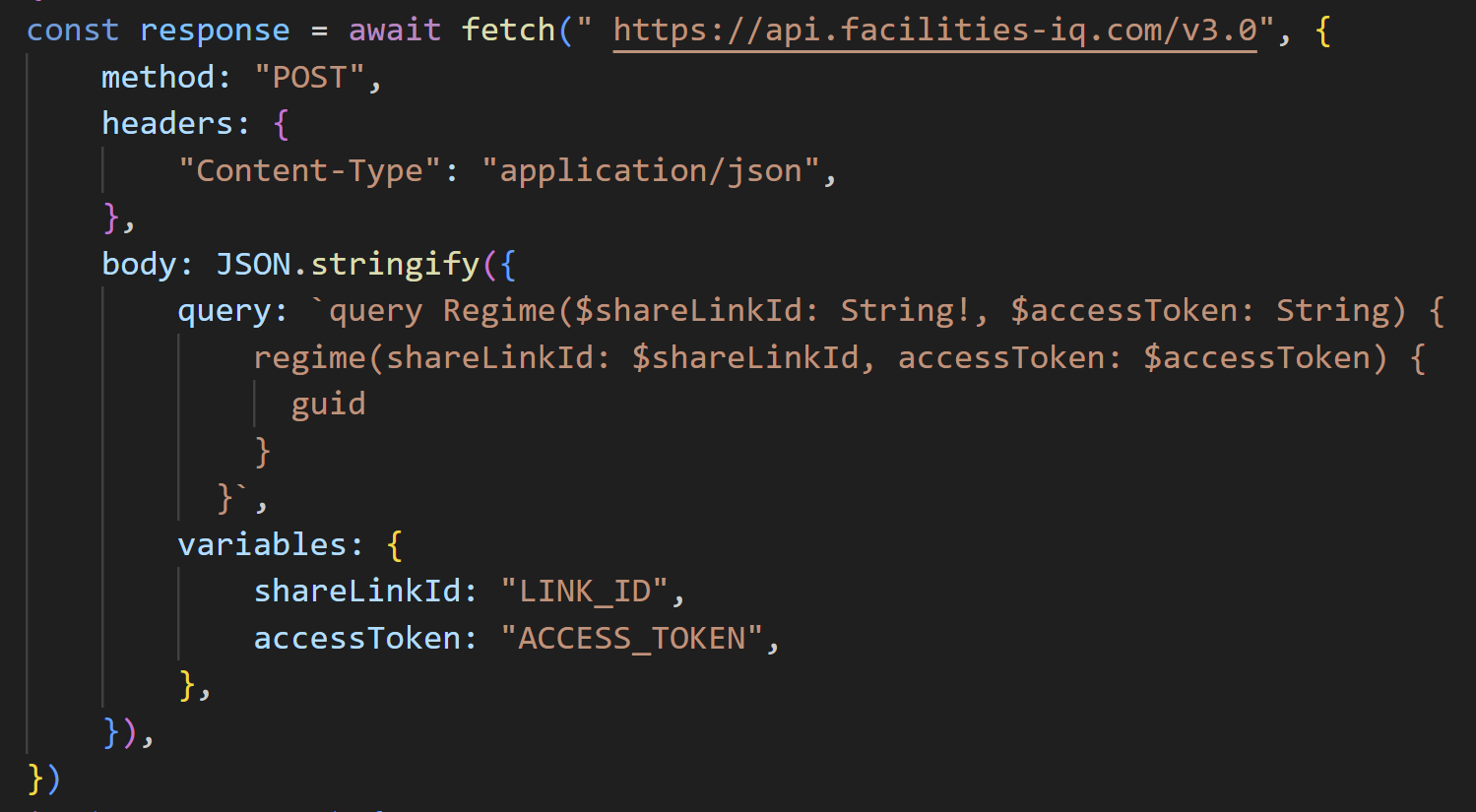
Details on the API are found later in this document.
Access the API via the CLI
You can install the CLI on your local computer. Before installing it you must have installed NodeJS version 18 or newer.
To install the CLI, open a terminal and type:
npm i -g @sfg20/cli
This will install the sfg20 command. Make sure it is installed by typing:
sfg20 --help
You should see the command help being displayed in your terminal.
The CLI comes with four built-in methods of returning data from the API:
frequencies
schedules
skills
tasks
To get a list of the current available methods type:
sfg20 list
You may use these methods or create your own by writing GraphQL queries and passing them to the CLI.
Retrieve data at the CLI by typing a command. For example to retrieve all of the tasks to the console in XML format, type the following, replacing SHARELINK and ACCESSTOKEN with the appropriate values:
sfg20 xml SHARELINK ACCESSTOKEN frequencies
If you want:
the data in JSON format
to store the results in a file called skills.json
the tasks broken down by skill set, type:
sfg20 json SHARELINK ACCESSTOKEN skills –-file ./skills.json
If you want to retrieve only the changes since a particular date (which includes entries for anything deleted) type:
sfg20 xml SHARELINK ACCESSTOKEN frequencies –-since 2023-09-01
You can write your own queries and pass them with the –query option. Examples of this type of query are shown later in this document.
See the –help output for more options.
The API
Retrieving Tasks
Use the regime query to retrieve tasks via the API. The parameters are documented in the IDE portal. There is also a full schema in the Full Schema section of this document; hyperlinks within the document will take you to their definitions within the schema.
| Parameter | Purpose |
|---|---|
| shareLinkId:String! | The ID of the share link |
| accessToken:String | The Access Token |
| changesSince:Date | The Date from which changes should be returned |
| forDays:Int = 365 | At present this should be left at 365 to return all values for a year. In future this parameter will be used for additional functionality. |
| minimumInterval:Int | The minimum time between tasks for a task to be returned measured in hours. E.g. 24 will not return tasks that should be performed more than once a day. |
| maximumInterval:Int | The maximum hours between tasks for a task to be returned. E.g. 8760 would mean tasks with an interval more than 1 year were not returned |
The real work of the API comes in the values requested back from the call. Specify values in the returned object to choose how data should be organised.
The return values are:
| Field | Meaning |
|---|---|
| assets | For future use. At present it returns entries for the number of assets listed in the regime for the specific schedule. |
| frequencies | Groups results into frequencies of execution – note that overlapping frequencies are returned. 3-month frequency includes all tasks that should happen at that visit, for example, 1 week, 1 month and 3 month tasks. |
| groups | The folder structure of the regime is used to organise tasks, which may frequently represent the physical structure of an organisation such as facilities, spaces, floors, and rooms. |
| schedules | Organise tasks by the schedule that owns them |
| skills | Organise the tasks by the skill required to perform the task |
| tasks | Return the tasks |
| words | For future use: it returns the smart words of the regime. |
| guid | Returns a unique ID that represents the current settings of the sharelink. Can be used to validate whether a cache is still relevant. The GUID will change if the settings of the share link have been updated. |
At each of the levels, such as groups or frequencies, you may further choose how to break down the tasks within each value. In this way you can create the shape of data that best fits your purposes.
Tip: It’s a good idea to look at the standard queries used by the CLI and use the IDE to experiment.
Data to be Sent to Facilities-iQ
The API should facilitate the following data to be sent to Facilities-iQ:
Has a task been completed (y/n).
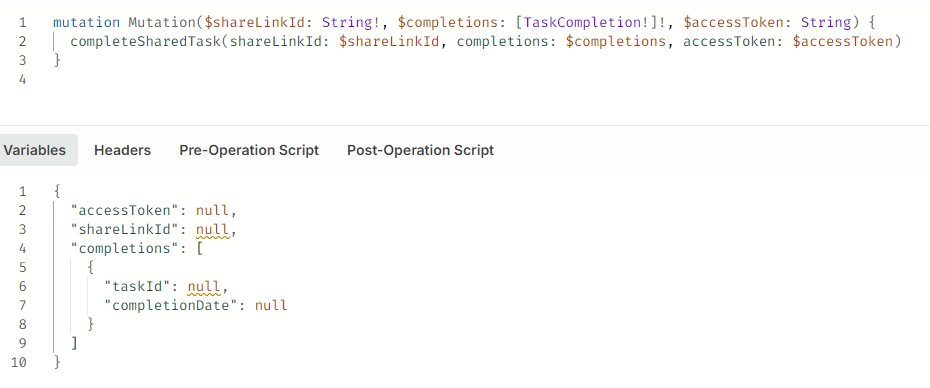
Date that the task was completed.
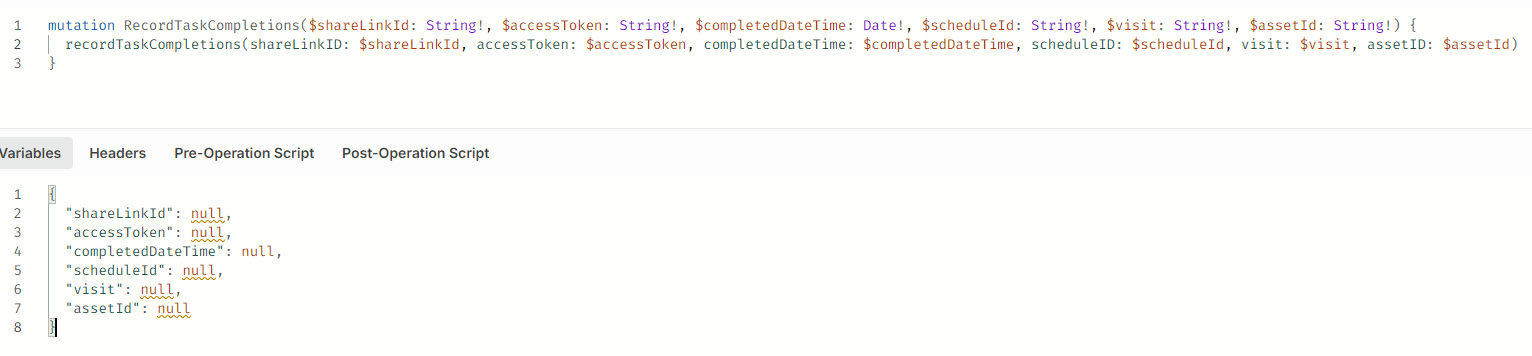
Standard Queries
The CLI provides some standard queries that shape the data in useful ways.
| Query | Shape |
|---|---|
| tasks | A plain list of all the tasks |
| schedules | A list of the schedules with all their tasks |
| frequencies | A breakdown of the frequencies that tasks should be performed, then all the tasks in each frequency. Frequencies overlap so that at the six months mark you would have all 3-month, 1-month, 1-week and others overlapping. |
| skills | First level is the required skill, then for each skill the frequencies of task and then for each frequency, the tasks at that frequency. |
If you want to a make a new query for the API, use the IDE and then copy to a file only the breakdown of the results; then reference the file using the –query parameter.
The following pages document the standard queries for the CLI.
Tasks
task: tasks{
            ... on APITask {
            __typename
            _status
            intervalInHours
            title
            id
            url
            linkId
            frequency {
            interval
            period
            }
            skill {
            Skilling
            SkillingCode
            CoreSkillingID
            }
            schedule {
            title
            code
            }
            content
            classification
            minutes
            step: steps
            }
            ... on DeletedRecord {
            __typename
            id
            }
            }
Schedules
schedules {
            ... on APISchedule {
            code
            id
            rawTitle
            title
            version
            modified
            task: tasks {
            ... on APITask {
            __typename
            _status
            id
            title
            content
            step: steps
            linkId
            url
            }
            ... on DeletedRecord {
            __typename
            id
            }
            }
            }
            }
Frequencies
frequencies {
            ... on APIFrequency {
            frequency {
            interval
            period
            }
            label
            tasks {
            ... on APITask {
            id
            content
            skill {
            Skilling
            }
            steps
            minutes
            title
            where
            classification
            linkId
            intervalInHours
            schedule {
            title
            code
            }
            _status
            }
            }
            }
            }
Skills
skills {
            ... on APISkill {
            skill {
            Skilling
            SkillingCode
            }
            countTasks
            frequencies {
            ... on APIFrequency {
            label
            frequency {
            interval
            period
            }
            countTasks
            tasks {
            ... on APITask {
            _status
            intervalInHours
            title
            id
            url
            linkId
            frequency {
            interval
            period
            }
            skill {
            Skilling
            SkillingCode
            CoreSkillingID
            }
            schedule {
            title
            code
            }
            content
            classification
            minutes
            steps
            }
            ... on DeletedRecord {
            id
            }
            }
            }
            }
            }
            }
Example API Output
This is an example of the output of the schedules standard query: we see one schedule with two tasks. Each task includes:
the frequency of the task
the amount of time the task should take
the block of content, including the Smart Words
the broken-out individual steps
The output also includes a URL that can be used with a free Facilities-iQ account to view the complete detail of the task and all other introductory procedures. The Smart Words can be typed into the SFG20 application (iOS and Android) to show the complete detail of the task and the introductory procedures.
            {
  "code": "66-02",
  "id": "gpoZQkaq5nsXhA!266",
  "rawTitle": "Hydrotherapy Pools",
  "title": "Test Regime › Coachmans Cottage › Test - Hydrotherapy Pools",
  "version": "4",
  "modified": "2022-08-03T11:16:52.2129813Z",
  "task": [
    {
      "__typename": "APITask",
      "_status": null,
      "id": "DrH7AyrFUImrkd.gpoZQkaq5nsXhA!266.266.1",
      "title": "Hoists - daily checks",
      "content": "* Operate all hoists daily as per the manufacturer's handbook.\n* Check operation and adjustment of hoist controllers; if found unresponsive or improperly adjusted, initiate repair or adjustment.\n* Check effectiveness of hoist brakes and clutches; if ineffectiveness is noticed, repair or adjust them immediately.\n* Visually inspect hoist wire or chain to ensure they are correctly located on drum, sheaves, or pulleys; if incorrectly located, reposition as required.\n* Visually check hoist supporting structure and all bolted connections to ensure nothing has worked loose; tighten any loose bolts.\n* Record any hoist defects encountered during daily checks in the daily log book.\n\nSmart Words: quarter minor incident",
      "frequency": {
        "interval": 1,
        "period": "Day"
      },
      "intervalInHours": 24,
      "minutes": 7.5,
      "step": [
        "Operate all hoists daily as per the manufacturer's handbook.",
        "Check operation and adjustment of hoist controllers; if found unresponsive or improperly adjusted, initiate repair or adjustment.",
        "Check effectiveness of hoist brakes and clutches; if ineffectiveness is noticed, repair or adjust them immediately.",
        "Visually inspect hoist wire or chain to ensure they are correctly located on drum, sheaves, or pulleys; if incorrectly located, reposition as required.",
        "Visually check hoist supporting structure and all bolted connections to ensure nothing has worked loose; tighten any loose bolts.",
        "Record any hoist defects encountered during daily checks in the daily log book."
      ],
      "linkId": "quarter minor incident",
      "url": "http://localhost:3030/sfg20?phrase=quarter+minor+incident"
    },
    {
      "__typename": "APITask",
      "_status": null,
      "id": "DrH7AyrFUImrkd.gpoZQkaq5nsXhA!266.266.7",
      "title": "Log book",
      "content": "* Consult the Log Book for any reported defects and address them as necessary, wearing appropriate personal protective equipment if required.\n* Record any completed works in the Log Book clearly according to the operating code of practice.\n\nSmart Words: negative fact decorate",
      "frequency": {
        "interval": 1,
        "period": "Month"
      },
      "intervalInHours": 730,
      "minutes": 15,
      "step": [
        "Consult the Log Book for any reported defects and address them as necessary, wearing appropriate personal protective equipment if required.",
        "Record any completed works in the Log Book clearly according to the operating code of practice."
      ],
      "linkId": "negative fact decorate",
      "url": "http://localhost:3030/sfg20?phrase=negative+fact+decorate"
    }
  ]
}
Display SFG20 Tasks
You may display the relevant information retrieved from the API in your application. The aide-memoire step list is not the complete SFG20 task or schedule. All parties should be familiar with the complete schedule and all introductory procedures when undertaking work.
The Smart Words and the task URL provided by the API can be used to freely access the complete schedule in Facilities-iQ or in the SFG20 application. You must therefore show one or both task links when you show the content. You may only use the URL in isolation if it is a hyperlink that the user can follow with a single click.
The Smart Words are a good choice for display on mobile devices because they can be used in the SFG20 application.
Important Note: Due to tailoring, a task for the same schedule may differ in different locations within a Maintenance Regime. Never cache individual schedules by code. The id field is unique to each tailorable schedule and task and can be used for caching.
Note: You may make Smart Words and step lists available in other forms, such as Excel spreadsheets and Word documents. You may not publish, or allow to be published, lists of Smart Words or URLs in a public format, such as on a publicly accessible website. If you include tasks or step lists in a document, they must be accompanied by the relevant Smart Words.
Mark a Task Complete
When tasks are completed, there are two separate mutations you can call depending on how you wish to process the data:
Use completeSharedTask to update the companion application, however it requires each specific task completed.
Maintain a larger log of compliance with recordTaskCompletions, which assumes the entirety of a schedule has been completed if no task completions have been passed.
You can pass multiple task completions in one call on both mutations, and you are not restricted to one or the other.
The API provides task ids for each task you retrieved; pass them to the mutation. For each taskId you must supply:
the date of completion
an optional assetIndex if is are more than one asset for the taskId
an optional JSON metadata object with other information you wish to record (for example the person who completed the task)
Full Schema
This section contains the full schema for all types and queries available on the API. As future modules are released, this document will be updated with tables containing relevant fields, arguments, and short descriptions of the purpose served by the new feature.
The following table contains an explanation of the different symbols used in the type column of each table. These symbols may be used in conjunction with one another.
For example, [ type ! ] as a return value would indicate that the query may return either null, or an array which cannot contain null values.
The usage of ! is context dependent. In the case of return values, it indicates that this value will never be null. When used in an argument column, it indicates a required field.
An access token is always required.
| Key | Meaning |
|---|---|
| type | The type is nullable/optional |
| type ! | The type is not nullable/required |
| [ type ] | An array of type |
| type = value | type has a default value |
Share links
This section of the schema covers the handling of share links and regime data. It covers all the queries, mutations and objects related to the pulling of regime data from a given sharelink, marking tasks as complete, and querying their completion state.
Queries
batchRegimes
The batchRegimes query returns an array of objects, each of which are made up of a StepResult and the corresponding share link ID. This call allows you to return multiple regimes owned by a client which have been shared with your domain. You must pass a sharelink ID to match the client.
Returns: [ BatchedStepResult ]
Arguments
| Name | Description | Type |
|---|---|---|
| shareLinkId | The share link identifier, required to resolve the target client | String ! |
| accessToken | The access token that SFG20 have provided you | String ! |
| changesSince | An optional date that you wish to see the changes since | Date |
| startDate | The date from which you wish to retrieve tasks, usually left blank | Date |
| forDays | The period over which tasks should be created, left blank for a single year, include a larger range should you wish to create tasks which are multi-year apart | Int = 365 |
| minimumInterval | The minimum time between tasks, measured in hours | Int |
| maximumInterval | The maximum time between tasks, measured in hours | Int |
regime
The regime query returns a singular object containing the data corresponding to the passed query string. The structure of the data is like batchRegimes, the primary difference being that where batchRegimes uses the link ID to resolve the client, and return data related to all regimes your token has access to, the regime query specifically targets the one link ID that has been passed.
Returns: StepResult
Arguments
| Name | Description | Type |
|---|---|---|
| shareLinkId | The share link identifier, this is the share link you wish to retrieve data from | String ! |
| accessToken | The access token that SFG20 have provided you | String ! |
| changesSince | An optional date that you wish to see the changes since | Date |
| startDate | The date from which you wish to retrieve tasks, usually left blank | Date |
| forDays | The period over which tasks should be created, left blank for a single year, include a larger range should you wish to create tasks which are multi-year apart | Int = 365 |
| minimumInterval | The minimum time between tasks, measured in hours | Int |
| maximumInterval | The maximum time between tasks, measured in hours | Int |
regimeGuid
Returns a unique identifier for a regime, based on the settings of the share link at the current time. This can be useful if you wish to cache results. Your cache will be invalidated if the settings of the link are changed by a Facilities-iQ user.
Returns: String
Arguments
| Name | Description | Type |
|---|---|---|
| shareLinkId | The share link identifier | String ! |
areTasksComplete
Use to query the last completion dates for each task in the array
Returns: [ Date ]
Arguments:
| Name | Description | Type |
|---|---|---|
| shareLinkId | The id of the sharelink | String ! |
| accessToken | The access token that SFG20 have provided you with | String ! |
| onDate | The date on which you wish to know the tasks completion status | Date |
| Tasks | The tasks you are querying the completion status for | [ TaskQuery ! ] ! |
isTaskComplete
Use to query the last completion date of a specific task
Returns: Date
Arguments
| Name | Description | Type |
|---|---|---|
| shareLinkId | The id of the sharelink | String ! |
| accessToken | The access token SFG20 have provided you | String ! |
| onDate | The date you wish to query for | Date |
| taskId | The ID of the task you wish to query for | String ! |
| assetIndex | The 0 based index of the asset you wish to query for | Int |
| assetId | The id of the asset you wish to query for | String |
Mutations
closeIssueReport
Use to close an issue report.
Returns: Boolean
Arguments
| Name | Description | Type |
|---|---|---|
| accessToken | The access token SFG20 have provided you | String ! |
| shareLinkId | The share link that the issue report is related to | String |
| reportId | The Id of the issue report | String ! |
| signature | The signature of the closing individual | JSONObject |
| metadata | Additional data related to the closing | JSONObject |
completeSharedTask
Use to marks tasks as complete. See the Mark a Task Complete section for further information.
Returns: Boolean
Arguments
| Name | Description | Type |
|---|---|---|
| accessToken | The access token SFG20 have provided you | String ! |
| shareLinkId | The id of the share link you wish to mark tasks complete within | String ! |
| completions | The task completions | [ TaskCompletion ! ] ! |
reportIssue
Reports identified issues during the undertaking of a task.
Returns: String
Arguments
| Name | Description | Type |
|---|---|---|
| shareLinkId | The id of the sharelink | String ! |
| accessToken | The access token SFG20 have provided you | String ! |
| taskId | The id of the task on which the issue has occurred | String ! |
| assetIndex | The 0 based index of the asset on which the issue has occurred | Int |
| assetId | The id of the asset on which the issue has occurred | String |
| reportDate | The date of the issue being reported | Date ! |
| metadata | Any additional metadata provided | JSONObject |
| report | The issue report | String ! |
| attachments | Attachments related to the issue | [ JSONObject ! ] |
recordTaskCompletions
Use recordTaskCompletions as the preferred way to confirm the completion of tasks using the API. When passing only the required fields, it will assume that all tasks for a given asset, from a given schedule, have been completed.
This mutation is used to sustain a record of compliance with the SFG20 standard.
Returns: Boolean
| Name | Description | Type |
|---|---|---|
| shareLinkId | The ID of the sharelink for which you wish to record completions | String ! |
| accessToken | The access token SFG20 have provided to you | String ! |
| completedDateTime | The date upon which the completions occurred | Date ! |
| scheduleID | The ID of the schedule the completed tasks are related to | String ! |
| visit | The visit upon which the tasks were completed. That is, 1D, 1W | String ! |
| assetID | The ID of the asset upon which the tasks were performed | String ! |
| startedDateTime | The date and time at which the tasks were started | Date |
| tasksCompleted | The tasks that were completed | [ CompletionInput ] |
| engineerID | The ID of the performing engineer | String |
| engineerName | The name of the performing engineer | String |
| engineerNotes | Any notes taken by the engineer during completion | String |
| assetCondition | The condition of the asset during completion | String |
| otherInformation | Any additional information you wish to store alongside the completion | JSONObject |
Objects
BatchedStepResult
The BatchedStepResult object contains the regime data requested by a specific query, bundled up with the ID corresponding to the link the data was retrieved from. An array of BatchedStepResult is returned by the batchRegimes query.
| Field name | Description | Return type |
|---|---|---|
| regime | The regime data corresponding to this link ID | StepResult ! |
| shareLinkId | The link ID for the regime in this object | String ! |
StepResult
A StepResult is the result of the regime query. It is an object containing all the data corresponding to the requested fields in the built query.
The structure of the returned JSON object will mirror the structure of the query string. It is also the object which will populate the ‘regime’ property of a BatchedStepResult object.
| Field name | description | Return type |
|---|---|---|
| assets | A collection of the assets in the share link | [ DAPIAsset ! ] ! |
| frequencies | A collection of the frequencies of tasks in the share link | [ DAPIFrequency ! ] ! |
| groups | A collection of the groups, or hierarchal structure of the share link | [ DAPIGroup ! ] ! |
| guid | A unique identifier for the share link and its current settings | String ! |
| schedules | A collection of the schedules in the share link | [ DAPISchedule ! ] ! |
| skills | A collection of the skills in the share link | [ DAPISkill ! ] ! |
| tasks | A collection of the tasks in the share link | [ DAPITask ! ] ! |
| words | The SFG20 Smart Words for the share link | String ! |
APIAsset
Note: This is for future use: At present it returns entries for the number of assets listed in the regime for the specific schedule.
| Field name | description | Return type |
|---|---|---|
| description | A description of the asset | String |
| frequencies | The frequencies of tasks for this asset | [ DAPIFrequency ! ] ! |
| id | The ID of this asset | String ! |
| index | The 0 based index of the asset for the schedule to which it is attached | Int ! |
| schedule | The schedule for which this is an asset | APISchedule |
| skills | The skills required by this asset | [ DAPISkill ! ] ! |
| tag | The asset tag id, the externally granted id for this asset | String |
APIFrequency
This object represents visit frequencies. When used at the top level of the query it will collate all tasks which must be completed on a specific visit and put them into that frequency object.
For example, if there are four tasks:
1-day task - The 1-day task will be present in all frequency objects
2-week task - The 2-week task will be present in both the 2, and 4-week frequency object
3- week task - The 3-week task will only be present in the 3-week object
4- week task - The 4-week task will only be present in the 4-week object
If you want to retrieve only the frequency of a given task with no collation, please see Frequency, which is available on the APITask object.
| Field name | Description | Return type |
|---|---|---|
| assets | The assets that require attention at this frequency | [ DAPIAsset ! ] ! |
| countAssets | The number of assets requiring attention at this frequency | Int ! |
| countSchedules | The number of assets requiring attention at this frequency | Int ! |
| countTasks | The number of tasks to be performed at this frequency | Int ! |
| frequency | The frequency that tasks should be applied | Frequency ! |
| intervalInHours | The interval, in hours, between tasks at this frequency | Int ! |
| label | A simple label version of the frequency | String ! |
| schedules | The schedules to which this frequency applies | [ DAPISchedule ! ] ! |
| skills | The skills required at this frequency | [ DAPISkill ! ] ! |
| tasks | The tasks that should be performed at this frequency | [ DAPITask ! ] ! |
APIGroup
The APIGroup object represents the hierarchical structure of a regime. Groups can be of different types, such as floors and systems. Each have an ID and a reference to their parent ID.
The top level of the regime has the ID _root. Place - schedules in some form of child group under the root, so that, when accessing data organised by groups, the object in the array corresponding to the root will not contain any schedules, tasks, or skills.
| Field name | Description | Return type |
|---|---|---|
| assetCount | The number of assets in this group | Int |
| assets | A collection of the assets included in the group | [ DAPIAsset ! ] ! |
| details | Further details about the group | String |
| frequencies | A collection of the frequencies for tasks required by the group | [ DAPIFrequency ! ] ! |
| frequencyCount | The number of frequencies for tasks in the group | Int |
| id | The id of the group/folder | String ! |
| parentGroupId | The id of the parent of the group | String |
| scheduleCount | The number of schedules in the group | Int |
| schedules | A collection of the schedules included by the group | [ DAPISchedule ! ] ! |
| skills | A collection of the skills required by the group | [ DAPISkill ! ] ! |
| taskCount | The number of tasks in the group | Int |
| tasks | A collection of the tasks in the group | [ DAPITask ] |
| title | The name of the group | String |
| type | The type of group; for example, floor or system | String |
APISchedule
The APISchedule object represents an individual schedule. It can be used as a vector to access tasks grouped by their schedule.
Legislation, notes, and introductory content will not be available through the API. Use available smart words at a task level to redirect users to Facilities-iQ where this information is available.
Schedules without tasks, such as introductory schedules, are excluded from the API.
| Field name | Description | Return type |
|---|---|---|
| assets | All of the assets associated with this schedule | [ DAPIAsset ! ] ! |
| code | The code number used to identify this schedule | String ! |
| frequencies | The frequencies of tasks for this schedule | [ DAPIFrequency ! ] ! |
| id | The id of the schedule | String ! |
| modified | The last time the schedule was modified | Date |
| rawTitle | The raw title of the schedule, which is the plain name of the schedule. | String ! |
| rawWhere | The location of the schedule within the regime, ensuring all characters are ASCII | String ! |
| retired | Whether the schedule is retired or not | Boolean |
| scheduleCategories | Indicates the grouping of a schedule within the SFG20 library. Equivalent of the scheduleCategory field on the superseded API | [ String ] |
| skills | The skills required by this schedule | [ DAPISkill ! ] ! |
| tasks | All of the tasks required by this schedule | [ DAPITask ! ] ! |
| title | The title of the schedule, this includes the location within the hierarchy | String ! |
| version | The version number of the schedule | String ! |
APISkill
The APISkill object is a wrapper around the skill used within the regime. It contains a field allowing you to access the skill itself (see Skill) as well as retrieve information regarding the tasks which need to be completed by a person with this skillset; including information regarding their frequency, the location of the task, and their related schedules.
| Field name | description | Return type |
|---|---|---|
| assets | The assets to which this skill should be applied | [ DAPIAsset ! ] ! |
| countTasks | The number of tasks that this skill is needed for | Int |
| frequencies | The frequencies with which the tasks for this skill should be performed | [ DAPIFrequency ! ] ! |
| groups | The hierarchy/folder structure to which this skill applies | [ DAPIGroup ! ] ! |
| schedules | The schedules to which the tasks for this skill apply | [ DAPISchedule ! ] ! |
| skill | The skill required for tasks | Skill |
| tasks | The tasks that require this skill | [ DAPITask ! ] ! |
APITask
The APITask object represents the individual tasks present within the regime. Depending on the structure of the query, these tasks can be grouped by schedule, frequency, skill, location or asset.
When passing the changesSince parameter to either batchRegimes or regime, the _status field provides a string value indicating how the task has changed since the date passed as an argument. This value can be Added, Changed, or Not Applicable.
| Field name | description | Return type |
|---|---|---|
| _status | The status of a record | RecordStatus |
| classification | The classification of a task | Classification ! |
| content | The aide memoire content of the task as a single text field, processed by AI | String ! |
| date | The date on which the task should be done | Date ! |
| frequency | The frequency the task should be carried out | Frequency ! |
| id | The tasks unique id, used to inform the API of task completions | String ! |
| intervalInHours | The number of hours between this task being carried out | Int |
| linkId | A three-word SFG20 Smart Words to locate this task in Facilities-IQ | String ! |
| minutes | The number of minutes the task is estimated to take | Float |
| schedule | The schedule to which this task belongs | APISchedule ! |
| skill | The skill required for this task | Skill |
| fullContent | Task content in plaintext with no AI processing | String ! |
| fullHtmlContent | Task content with html formatting and no AI processing | String ! |
| steps | A list of short steps which comprise the aide memoire for the content, summarised by AI | [ String ! ] ! |
| title | The title of the task | String ! |
| url | The URL where the complete task description can be found | String ! |
| where | The location where the asset(s) associated with this task are located | String |
Frequency
An object representing an individual frequency. Accessible through APIFrequency and APITask, it is used to identify the frequency at which tasks should be performed.
| Field name | Description | Return Type |
|---|---|---|
| interval | An integer value representing the interval at which a task should be completed | Int |
| period | A value representing the measurement of time | Period |
Skill
An object representing a skill and any information related to the identity of the skill itself. This is accessible through the APISkill object, where it can be bundled with data relating to the tasks for which this skill is required.
| Field name | Description | Return Type |
|---|---|---|
| CoreSkillingID | The internal ID of this skill | String |
| Rate | A representation of the expected rate to be charged for this skill | Float |
| Skilling | The anglicised name of this skill | String |
| SkillingCode | The skill code used to refer to this skill | String |
| _id | Internal record id | String ! |
DeletedRecord
Indicative of an item of a corresponding id being deleted.
| Name | Description | Type |
|---|---|---|
| id | The id of the deleted record | String ! |
TaskQuery
Passed as an argument when querying the completion status of tasks, this object is used to identify a specific task for a specific asset.
| Field name | Description | Type |
|---|---|---|
| assetId | The id of the asset for the task | String |
| assetIndex | The 0 based index of the asset for the task | Int |
| taskId | The id of the task itself | String ! |
TaskCompletion
The task completion object is used as an be marked as completed in Facilities-iQ.
| Field name | Description | Type |
|---|---|---|
| assetId | The id of the asset you wish to mark the task completed for | String |
| assetIndex | The 0 based index of the asset you wish to complete the task for | Int |
| completionDate | The date on which the task was completed | Date ! |
| metadata | Additional data related to the task completion | JSONObject |
| taskId | The id of the completed task | String ! |
CompletionInput
A CompletionInput object represents a single completed task for the recordTaskCompletions query. If this is not passed as an argument when making use of the mutation, it will be assumed that all tasks of the given schedule are completed.
| Field name | Description | Type |
|---|---|---|
| completedDateTime | The date and time at which a task was completed | Date ! |
| durationInMinutes | The duration, in minutes, of the task | Int |
| startedDateTime | The date and time at which a task was started | Date |
| taskID | The ID of the completed task | String ! |
Enums
| Field name | Possible Values | Value type |
|---|---|---|
| Period | Day Hour Minute Month Unknown Week Year |
String |
| RecordStatus | Added Not Applicable Changed |
String |
| Classification | Red pink Amber Green |
String |
Unions
A union is a collection of two or more types which can be returned in place of each other. This means that a query returning, for example, DAPIGroup can return either a DeletedRecord, or an APIGroup object.
The __typename property on the returned object contains a string value which can be used to identify which type has been returned.
| Name | Unified types |
|---|---|
| DAPIAsset | |
| DAPIFrequency | |
| DAPIGroup | |
| DAPISkill | |
| DAPISchedule | |
| DAPITask |
Webhooks
This section of the schema covers the webhook system, which allows you to register for notifications on different events which take place in Facilities-iQ.
Webhook types are the types of events you can receive notifications about. The registerWebhook and listWebhooks queries both require one of these types to be passed as an argument.
In future iterations of the API, additional webhook types will be introduced. Currently supported types and their purpose are shown in the table below. These are string values.
Currently supported webhook types:
| Name | Purpose |
|---|---|
| sharelinkUpdated | Triggered when a new version of the regime related to a share link is pushed to a live state, and therefore considered updated |
Queries
listWebhooks
Allows you to list all webhooks of a specific type (see Webhook types), related to an access token. This query supports pagination.
Returns: [ WebHook ]
Arguments
| Name | Description | Type |
|---|---|---|
| accessToken | The access token that SFG20 have provided you with | String ! |
| type | The webhook type you wish to list | String ! |
| skip | How many you wish to skip, for pagination | Int |
| take | How many you wish to take, for pagination | Int |
getWebhook
Allows you to retrieve a specific webhook by id.
Returns: WebHook
Arguments
| Name | Description | Type |
|---|---|---|
| accessToken | The access token that SFG20 have provided you | String ! |
| id | The id of the webhook you wish to retrieve | String ! |
Mutations
registerWebhook
Allows you to register a new webhook or update an existing hook if one already exists with the corresponding key. For example, passing a new URL with a key that has an existing hook.
Note: You are advised no t to include the key in the webhook URL.
Webhooks require a type to be passed; each type serves a different purpose (see Webhook types).
Options is an optional field which can be used to store additional information. A table of currently supported options can be seen here.
Returns: JSONObject
Arguments
| Name | Description | Type |
|---|---|---|
| accessToken | The access token that SFG20 have provided you | String ! |
| type | The type of webhook you wish to register | String ! |
| key | The key for the webhook. In the context of share links, the key is the share link ID. | String ! |
| url | The URL you wish to receive notification to | String ! |
| options | Additional data | JSONObject |
deleteWebhook
Allows you to delete an existing webhook.
Returns: Boolean
Arguments
| Name | Description | Type |
|---|---|---|
| accessToken | The access token that SFG20 have provided you | String ! |
| id | The id of the webhook you received upon its creation | String ! |
Objects
WebHook
The WebHook object represents all information related to the registered webhook that is retrievable through the API.
| Field name | Description | Return type |
|---|---|---|
| failureCount | The number of times the webhook notification process for this hook has failed | Int |
| id | The id for the webhook | String ! |
| key | The key for the hook, the same value passed during registration | String ! |
| lastError | The error message from the last time an error occurred | String |
| lastErrorStatus | The error code from the last time an error occurred | String |
| lastFailure | A timestamp from the last time the webhook notification failed | String |
| lastSuccess | A timestamp from the last time the webhook notification succeeded | String |
| options | The optional data passed during registration | Options |
| successCount | The number of times the webhook notification process for this hook has succeeded | Int |
| type | The type of hook | String! |
| url | The url receiving notifications for this hook | String ! |
Options
Options is the optional data passed during registration of a hook and stored with the hook.
Currently supported properties on the Options object:
| Field name | Description | Type |
|---|---|---|
| data | Data you wish to store alongside the hook, maximum character length of 2048 | String |